battery TESLA MODEL X 2017 Owner's Manual
[x] Cancel search | Manufacturer: TESLA, Model Year: 2017, Model line: MODEL X, Model: TESLA MODEL X 2017Pages: 198, PDF Size: 4.87 MB
Page 7 of 198
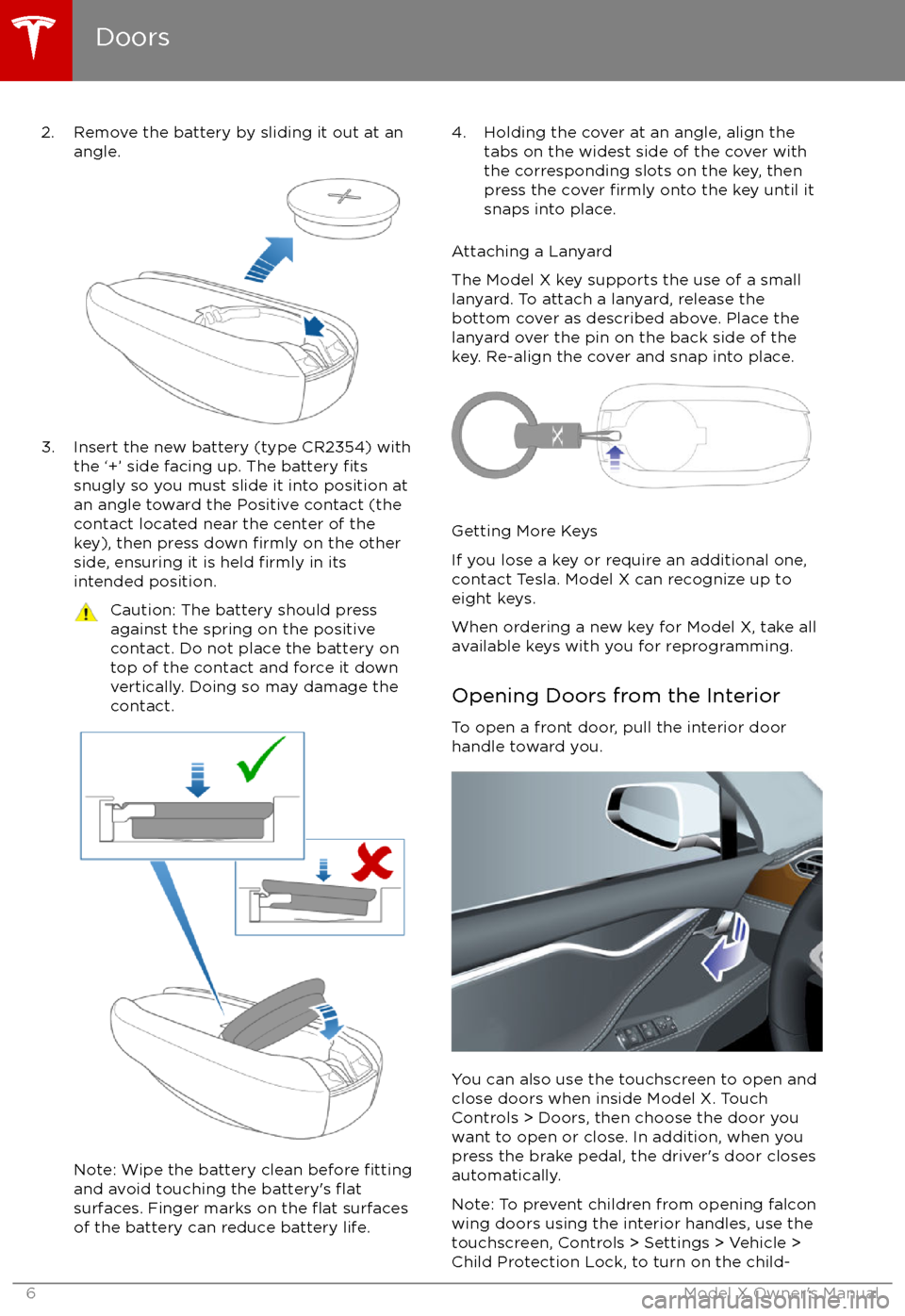
2. Remove the battery by sliding it out at anangle.
3. Insert the new battery (type CR2354) withthe
Page 58 of 198
Regenerative Braking
Whenever Model X is moving and your foot is
off the accelerator, regenerative braking slows
down Model X and feeds any surplus energy
back to the Battery.
By anticipating your stops and simply
removing pressure from the accelerator to slow down, you can take advantage ofregenerative braking to increase driving range.
Of course, this is no substitute for regular braking when needed for safety.
Note: If regenerative braking is aggressively
slowing Model X, such as on a steep descent,
brake lights turn on to alert other road usersthat you are slowing down.
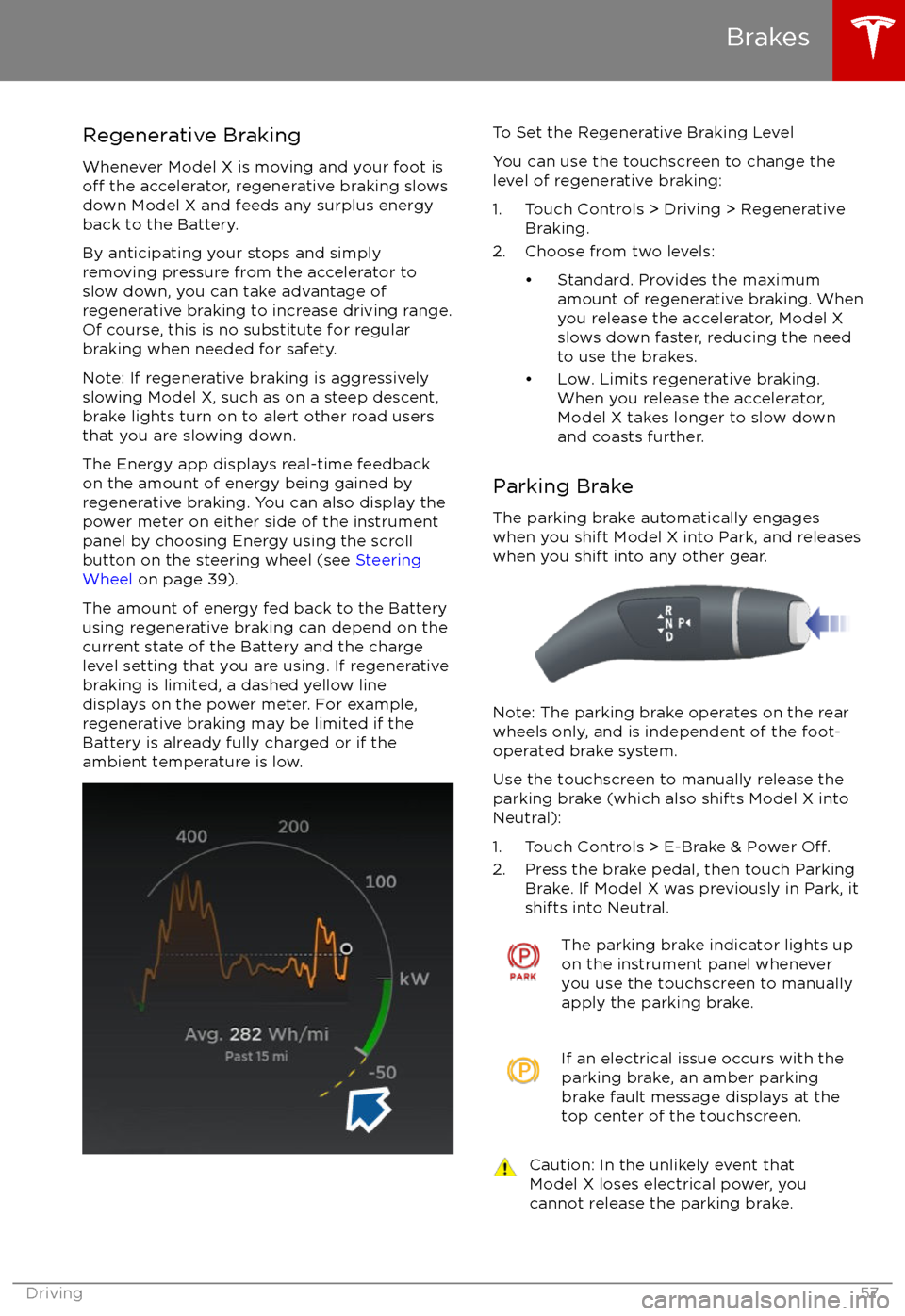
The Energy app displays real-time feedback on the amount of energy being gained by
regenerative braking. You can also display the
power meter on either side of the instrument panel by choosing Energy using the scroll
button on the steering wheel (see Steering
Wheel on page 39).
The amount of energy fed back to the Battery using regenerative braking can depend on the
current state of the Battery and the charge level setting that you are using. If regenerative
braking is limited, a dashed yellow line
displays on the power meter. For example,
regenerative braking may be limited if the Battery is already fully charged or if the
ambient temperature is low.
To Set the Regenerative Braking Level
You can use the touchscreen to change the
level of regenerative braking:
1. Touch Controls > Driving > Regenerative Braking.
2. Choose from two levels:
Page 115 of 198
Overview of Climate Controls
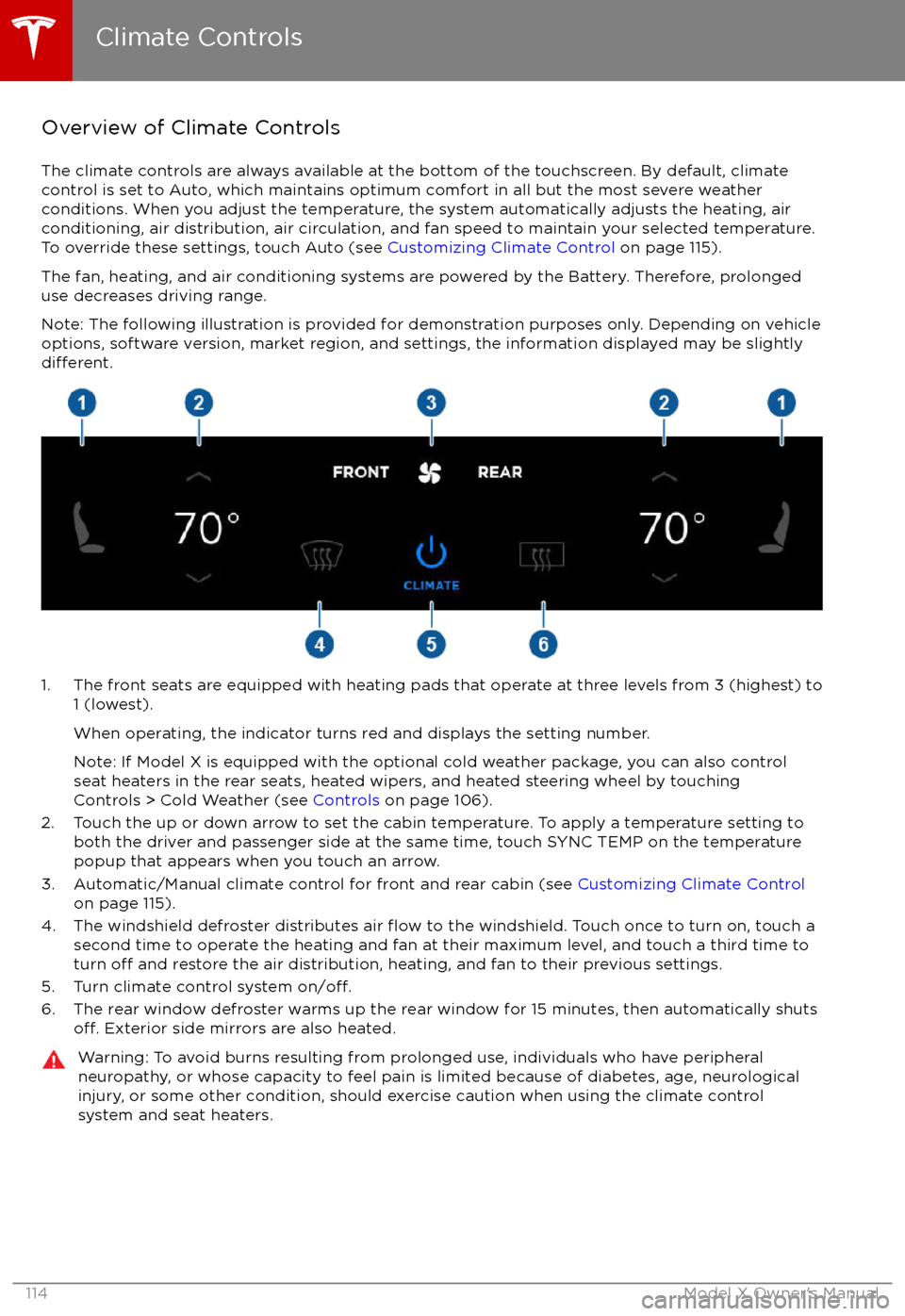
The climate controls are always available at the bottom of the touchscreen. By default, climate control is set to Auto, which maintains optimum comfort in all but the most severe weather conditions. When you adjust the temperature, the system automatically adjusts the heating, air
conditioning, air distribution, air circulation, and fan speed to maintain your selected temperature. To override these settings, touch Auto (see Customizing Climate Control on page 115).
The fan, heating, and air conditioning systems are powered by the Battery. Therefore, prolonged
use decreases driving range.
Note: The following illustration is provided for demonstration purposes only. Depending on vehicle
options, software version, market region, and settings, the information displayed may be slightly
different.
1. The front seats are equipped with heating pads that operate at three levels from 3 (highest) to 1 (lowest).
When operating, the indicator turns red and displays the setting number.
Note: If Model X is equipped with the optional cold weather package, you can also control seat heaters in the rear seats, heated wipers, and heated steering wheel by touchingControls > Cold Weather (see Controls on page 106).
2. Touch the up or down arrow to set the cabin temperature. To apply a temperature setting to both the driver and passenger side at the same time, touch SYNC TEMP on the temperaturepopup that appears when you touch an arrow.
3. Automatic/Manual climate control for front and rear cabin (see Customizing Climate Control
on page 115).
4. The windshield defroster distributes air
flow to the windshield. Touch once to turn on, touch a
second time to operate the heating and fan at their maximum level, and touch a third time to
turn
off and restore the air distribution, heating, and fan to their previous settings.
5. Turn climate control system on/off.6. The rear window defroster warms up the rear window for 15 minutes, then automatically shutsoff. Exterior side mirrors are also heated.
Warning: To avoid burns resulting from prolonged use, individuals who have peripheral neuropathy, or whose capacity to feel pain is limited because of diabetes, age, neurologicalinjury, or some other condition, should exercise caution when using the climate control
system and seat heaters.
Climate Controls
114Model X Owner
Page 126 of 198

12V Power SocketYour Model X has a power socket located on
the front of the center console. An additional
12V power socket is located in the rear trunk.
Power is available whenever the instrument
panel and touchscreen are on.
The 12V power sockets are suitable for
accessories requiring up to 11A continuous
draw (15A peak) or a maximum of 150
continuous watts (180 watts peak).
Note: In situations where Model X is unable to detect the key (low battery, interference, etc.),
place it immediately below the 12V power
socket in the center console where Model X
can best detect it.
Warning: The power socket and an
accessory
Page 141 of 198

High Voltage Components
1. Front Motor
2. AC Compressor
3. Forward Junction Box
4. High Voltage Cabling
5. Battery Coolant Heater
6. DC-DC Converter
7. Cabin Heater
8. Battery
9. On-board Charger
10. Charge Port
11. Rear Motor
12. HV cable to Rear HVAC Assembly
Warning: The high voltage system has no user serviceable parts. Do not disassemble, remove or replace high voltage components, cables or connectors. High voltage cables are coloredorange for easy
identification.
Warning: Read and follow all instructions provided on the labels that are attached to Model X.
These labels are there for your safety.Warning: In the unlikely event that a fire occurs, immediately contact your local fireemergency responders.
Electric Vehicle Components
140Model X Owner
Page 143 of 198

About the Battery
Model X has one of the most sophisticated
battery systems in the world. The most
important way to preserve the Battery is to LEAVE YOUR Model X PLUGGED IN when you
are not using it. This is particularly important if you are not planning to drive Model X for
several weeks. When plugged in, Model X wakes up when needed to automatically
maintain a charge level that maximizes the
lifetime of the Battery.
There is no advantage to waiting until the
Battery
Page 148 of 198

Changing Charge SettingsThe charge settings screen displays on the touchscreen whenever the charge port door is open.
To display charge settings at any time, touch the Battery icon on the top of the touchscreen, or touch Controls > Charging (located in the upper right portion of the Controls screen).
Note: The following illustration is provided for demonstration purposes only and may vary slightly
depending on the software version and market region of your Model X.
1. Charge status messages (such as Charging Scheduled, Charging In Progress) display here.
2. To adjust the charge limit, touch Set Charge Limit, then touch the arrows to move the charge limit setting in 10% increments for daily driving, and 2% increments for trips. The setting youchoose applies to both immediate and scheduled charging sessions.
3.
Location-specific schedule. With Model X in Park, set a specific time when you want Model X
to begin charging at the current location. If, at the scheduled time, Model X is not plugged in
at the location, it will start charging as soon as you plug it in as long as you are plugging it in
within six hours of the scheduled time. If you plug in after six hours, Model X does not start charging until the scheduled time on the next day. To override this setting, touch Start
Charging or Stop Charging (see item 4). When you set a scheduled charging time, Model X displays the set time on the instrument panel and the touchscreen.
4. Touch to open the charge port door or to start (or stop) charging.
5. The current automatically sets to the maximum current available from the attached charge cable, unless it was previously reduced to a lower level.
If needed, touch the up/down arrows to change the current (for example, you may want to
reduce the current if you are concerned about overloading a domestic wiring circuit shared by other equipment). It is not possible to set the charging current to a level that exceeds themaximum available from the attached charge cable.
When you change the current, Model X remembers the location. So if you subsequently charge at the same location, you do not need to change it again.
Note: If Model X automatically reduced a charging location
Page 149 of 198

Charging Status
The following illustration is provided for demonstration purposes only and may vary slightly
depending on the software version and market region of your Model X.
1. Charging status information. For example, if Model X is charging, it displays the time remaining until fully charged at the currently selected charge level. When a charging session
has been scheduled, it displays when charging starts.
2. Total estimated driving distance (or energy) available. Instead of driving distance as shown here, you can display the percentage of battery energy remaining by touching Controls >
Settings > Units & Format > Energy & Charging.
Note: A portion of the battery image may appear blue. This indicates that a small portion of
the energy stored in the battery is not available because the battery is cold. This is normal and
no reason for concern. When the battery warms up, the blue portion no longer displays.
3. Charging rate per hour.
4. Estimated increase in driving distance (or energy) achieved so far in this charging session. Instead of driving distance as illustrated above, you can display the amount of energy gained
by touching Controls > Settings > Units & Format > Energy & Charging.
5. Current being supplied/current available from the connected power supply (see Changing
Charge Settings on page 147).
6. Voltage being supplied by the charge cable.
Note: If Model X is charging and detects unexpected
Page 164 of 198

Removing the Maintenance Panel
To check
fluid levels, remove the maintenance
panel:
1. Pull the rear edge of the maintenance panel upward to release the
five clips that
hold the panel in place.
2. Maneuver the maintenance panel toward the windshield to remove.
Caution: The maintenance panel protects
the front trunk from water. When re-
attaching, make sure it is fully seated.
Checking Battery Coolant
If the quantity of
fluid in the cooling system
drops below the recommended level, the
instrument panel displays a warning message.
Stop Model X as soon as safety permits and
contact Tesla.
Fluid Level Check
Tesla checks the Battery coolant level at the
regularly scheduled maintenance intervals.
DO NOT ADD FLUID. Doing so can result in
damage not covered by the warranty.
Topping Up the Battery Coolant
Under no circumstances should you add
coolant. If the instrument panel warns you that
the
fluid level is low, contact Tesla
immediately.
To maximize the performance and life of the
Battery, the cooling system uses a
specifictype of G-48 ethylene-glycol coolant (HOAT).
Contact Tesla for more specific information
about the coolant.
Checking Brake FluidWarning: Contact Tesla immediately if you
notice increased movement of the brake
pedal or a
significant loss of brake fluid.Driving under these conditions can result in extended stopping distances or
complete brake failure.
The Brake indicator on the
instrument panel alerts you if the
quantity of
fluid in the brake
reservoir drops below the
recommended level. If it displays
while driving, stop as soon as safety
permits by gently applying the
brakes. Do not continue driving.
Contact Tesla immediately.
Fluid Level Check
Tesla checks the brake
fluid level at the
regularly scheduled maintenance intervals.
Topping Up the Brake Fluid
Do not top up your brake
fluid. Tesla service
does this when you bring Model X in for
regular servicing. The following instructions
are provided for information purposes and future reference only:
1. Clean the
filler cap before removing to
prevent dirt from entering the reservoir.
2. Unscrew the cap and remove.
3. Top up the reservoir to the MAX mark using brake
fluid meeting DOT3specifications.4. Replace the filler cap.
Warning: Only use new fluid from a sealed
air-tight container. Never use previously
used
fluid or fluid from a previously
opened container
Page 174 of 198

Brakes
Type
4-wheel anti-lock braking system (ABS)
with Electronic Brake Force Distribution,
Integrated Advanced Stability Control and
Electronic Accelerator pedal actuated
regenerative braking systemCalipersFour piston fixedRotor Diameters (ventilated)Front: 13.98”/355 mm
Rear: 14.37”/365 mmFront Rotor thicknessNew: 1.26”/32 mm
Service limit: 1.18”/30 mmRear Rotor thicknessNew: 1.10”/28 mm
Service limit: 1.02”/26 mmFront Brake Pad Thickness (excluding back plate)New: 0.354”/9.0 mm
Service limit: 0.078”/2 mmRear Brake Pad Thickness (excluding back plate)New: 0.315”/8.0 mm
Service limit: 0.078”/2 mmElectronic Parking Brake (EPB) Pad Thickness
(excluding back plate). Electronic calipers self-
adjust for pad wear.New: 0.216”/5.5 mm
Service limit: 0.039”/1 mmParking brakeElectrically actuated parking brake
calipers
Suspension
FrontIndependent, double wishbone, air spring,
sway barRearIndependent, multi-link, air spring, sway
bar
Battery - 12V
Rating33 amp-hr or higherVoltage and Polarity12V negative (-) ground
Subsystems
Specifications173